Ability to Send the Folio Number for Payment Transactions
Stay sends the folio number or the account number for the payment transactions initiated from Stay through Agilysys Pay. This ensures accurate transaction-level reconciliation in the payment gateway reports, which is a mandatory finance and compliance requirement.
This enhancement is applicable for the following payment gateways:
-
FreedomPay
-
Shift4
-
Elavon
-
Eigen
-
Adyen
-
Planet
The Use Folio Number for Payment flag in the Credit Card section of the Agilysys Pay Setup screen (All Settings ➜ Accounting ➜ Agilysys Pay Setup) must be enabled to use this feature. This flag is disabled by default. When enabled, the folio ID of the respective folio in the reservation, group, or house account is sent from Stay to Agilysys Pay.
When users enable this flag, the Confirmation pop-up screen appears that displays the following message: By Turning ON the toggle, You acknowledge that Stay PMS will send the Folio Number, rather than the Reservation ID/Group ID/ House Account ID, in the payment request to the gateway.
Note: There will not be any change in the AR Account payment workflows.
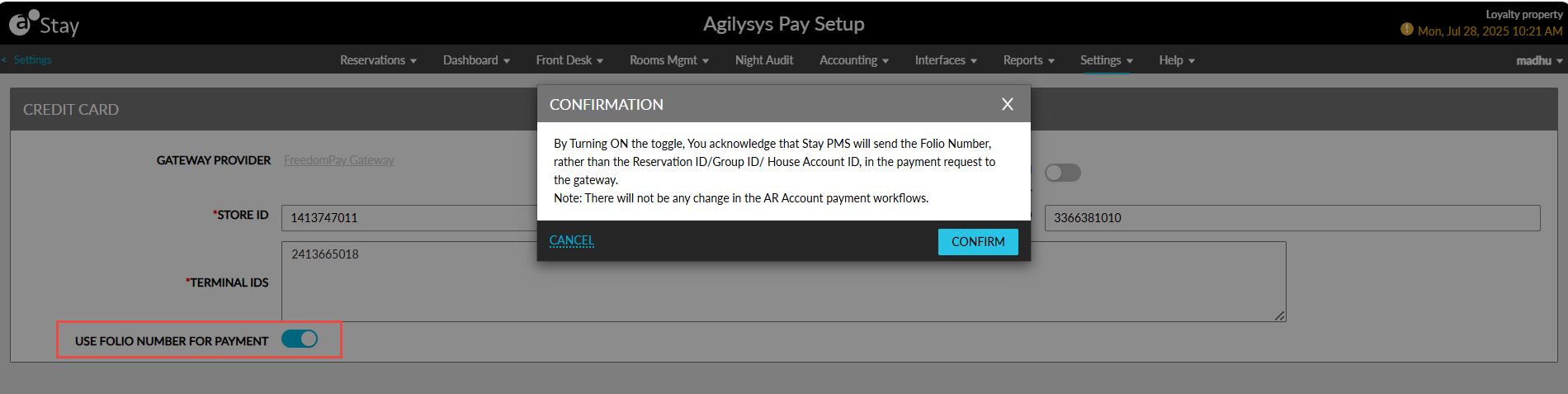
When users click Confirm, the toggle is enabled, and the folio ID is sent for the payment transactions.
When the flag remains disabled, the reservation ID, house account ID, or the group ID will be sent for the payment transactions as per the existing functionality. When this flag is disabled after being enabled previously, the Confirmation pop-up screen appears that displays the following message: By Turning OFF the toggle, You acknowledge that Stay PMS will send the Reservation ID/Group ID/House Account ID, rather than the Folio Number, in the payment request to the gateway.
Note: There will not be any change in the AR Account payment workflows.
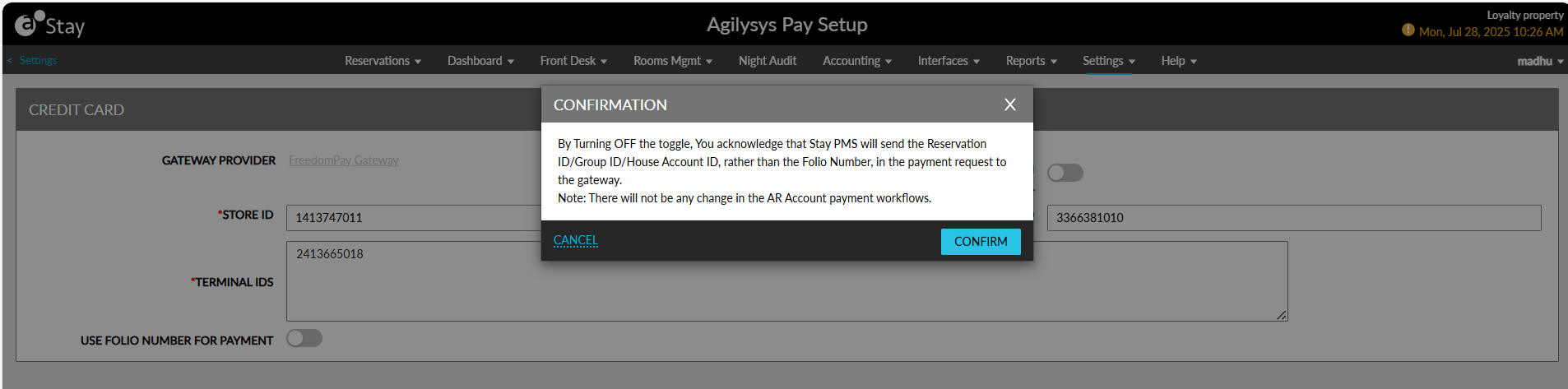
When users click Confirm, the flag is disabled, and the folio ID is no longer sent from Stay.
Impacted Areas
When the Use Folio Number for Payment flag is enabled, the folio ID is sent for the payment transactions performed in the following screens to Agilysys Pay:
-
Book a Reservation
-
Groups
-
Pantry (Front Desk ➜ Pantry)
-
Gift Card (Front Desk ➜ Gift Card)
-
House accounts
-
Lost and Found (Rooms Mgmt ➜ Lost and Found)
-
Batch Posting (Front Desk ➜ Batch Operations ➜ Batch Posting)
-
Night Audit
Send Folio ID for Payment Transactions
The folio ID of the respective folios in reservations, groups, and house accounts are sent to Agilysys Pay for both split and full payments made in these accounts.
The default folio ID is sent from Stay for the payment made in the following areas:
-
Deposit section in the Payment Method & Deposit tab of the Book a Reservation screen.
-
When making payment for the authorization amount, increase or decrease in the authorization amount, or releasing the authorization amount from the Payment Methods section of reservations.
The minimum value of the folio ID is sent in the following scenarios:
-
When transactions are performed from multiple folios of an account using the same payment method type.
-
When a default folio is present for the account, the folio ID of the default folio is sent.
-
The folio ID of the corresponding folio is sent in the following scenarios:
-
When making payments using a card token saved as a payment method.
-
When a refund transaction is performed.
-
When a payment is made in the following screens:
-
Pantry
-
Lost and Found
-
House accounts
-
Perform Refund for Payments
When a refund is initiated for a payment from Stay, the folio ID to which the refund must be credited is sent from Stay to Agilysys Pay.
Payments Using Gift Cards
When a gift card is issued to a guest, the folio ID details are obtained from the house account configured in the Gift Card section of the Agilysys Pay Setup screen (All Settings ➜ Accounting ➜ Agilysys Pay Setup) when the payment is not associated with a reservation.
Payments Made for Pantry Items
When a pantry item is purchased by a guest, the folio ID details are obtained from the default house account configured in the Pantry Setup screen (All Settings ➜ Accounting ➜ Pantry Management ) when the payment is not associated with a reservation.
Payments Made for Lost and Found Items
When a lost and found item is shipped to a guest and shipping charges are paid, the folio ID details are obtained from default house account configured in the General Configuration section of the Shipper tab in the Lost and Found screen (Rooms Mgmt ➜ Lost and Found ➜ Settings ➜ Shipper).